The motionEye project is alive! After many years, we have new pre-release versions.

In short: motionEye is alive again after years of silence. The project – an open-source web interface for the Motion video-detection software – has stagnated since version 0.42.1 in 2020, but pre-release versions 0.43.x are now landing. New in 0.43: Python 3.7+ requirement, support for Motion 4.4–4.6, added WebDAV support, redesigned controls, Docker images for riscv64, and translations into multiple languages including Czech (98% complete). The companion motionEyeOS image hasn't been refreshed yet, but motionEye itself can be installed manually or via Docker.

The motionEye project is an open-source web interface designed for managing and visualizing camera systems with motion detection. It serves as the frontend for the popular Motion software, which is specifically used for motion detection in video recordings, allowing users to conveniently monitor and control cameras through a browser.

The latest stable version of the motionEye project and motionEyeOS (the operating system image with motionEye implemented) is from 2020. Since then, there has been nothing new—until last year.
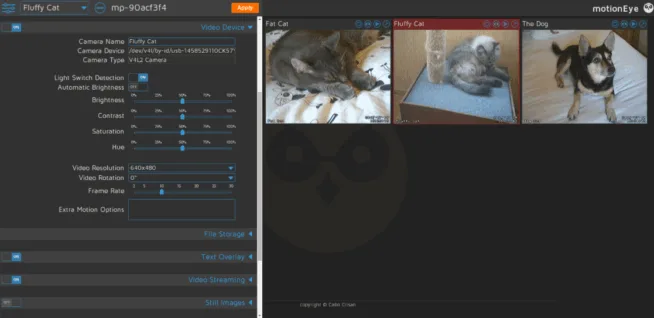
Version 0.42.1 is still labeled as “Latest,” but we now have versions 0.43.xy, which are marked as pre-release. This is good news because it means the motionEye project is still alive, even though motionEyeOS remains from 2020.

What’s new?

  • motionEye can only be used with Python 3.7 and newer
  • translation into several languages (including Czech – 98%)
  • support for the motion project versions 4.4 to 4.6
  • added support for WebDAV (a feature for collaboration and file management, as if it were a network drive)
  • modified control layout
  • support for Docker for riscv64 cores

Try out the new version 0.43.1b4 and let us know what you think!

Project page https://github.com/motioneye-project/motioneye

You are asking

What's the difference between motionEye and Motion?

motionEye is the web interface (the frontend) for browsing camera streams, configuring detection, and managing recordings. Motion is the underlying daemon that does the actual motion detection and recording. motionEye drives Motion via configuration files and API calls. You need both running, but most of your interaction happens through the motionEye web UI.

Can I run motionEye on a Raspberry Pi?

Yes – a Docker image is officially provided, including a build for riscv64 in the new 0.43.x branch. Manual installation also works on any system with Python 3.7 or newer. The aging motionEyeOS image (from 2020) is not yet rebuilt for the new version, so for current builds, install motionEye yourself on Raspberry Pi OS or another Linux distro instead of using the prebuilt OS image.

What's new in version 0.43?

Headline additions: support for Motion 4.4–4.6 (the older 0.42.1 was stuck on older Motion versions), WebDAV support so recordings can be exposed as a network drive, a redesigned control layout, multilingual translations including Czech at 98%, and Docker images for riscv64. The Python requirement also moved to 3.7 or newer.

Is the new version stable enough for daily use?

0.43.x releases are still labeled as pre-release on GitHub – 0.42.1 is still the official "Latest" stable. Use 0.43 if you want the new features and don't mind potential bugs, or stick with 0.42.1 for existing installations until a stable 0.43 is tagged. Try the latest 0.43.1b4 release and report any issues to the project on GitHub.
Share the article:
Show your
Maker soul!
Buy a T-Shirt
Coffee for Chiptron
Give a boost to the next article

Related Articles

ESPHome 2025.8.0 brings significant updates in hardware support and major performance improvements along with memory optimizations. Released on August 20, 2025, this update enhances the platform’s capabilities, particularly with support for new devices, ESP-NOW, faster string processing, and reduction of…

Object, animal, or person detection can be easily accomplished today thanks to AI. Michal Ševčík wrote this article for his project OnlyBirds – bird detection. The same knowledge can be applied to detect other animals or objects. Here, you’ll learn…

I liked the project zivyobraz.eu because it simply makes ePaper/eInk display technology accessible to regular people without programming knowledge. They can easily create their own information display. What appears on the display is entirely up to them. The service offers…

Less than six months ago, Qualcomm entered the maker community through the acquisition of Arduino. Moreover, Qualcomm introduced its own development board – the UNO Q. Now, we have another addition to the family of high-performance boards – the VENTUNO…

We know the CHIP computer, we connected to WiFi, we used UART, we tried WiFi speed connection and USB flashdisc, we measured power consumption during the boot and after boot and we blinked with LED. Today, we use USB webcam.…

Are you waiting for a new single-board computer with powerful RK3399 processor by Rockchip?? The RK3399 with support of USB 3.0 is now included a new single-board computer by FriendlyELEC – NanoPi M4 from 65 USD. You can buy a…

Trends