Linux on ESP32 isn’t exactly a new idea. Earlier projects got it running by emulating another CPU. This time the situation is a lot more interesting.
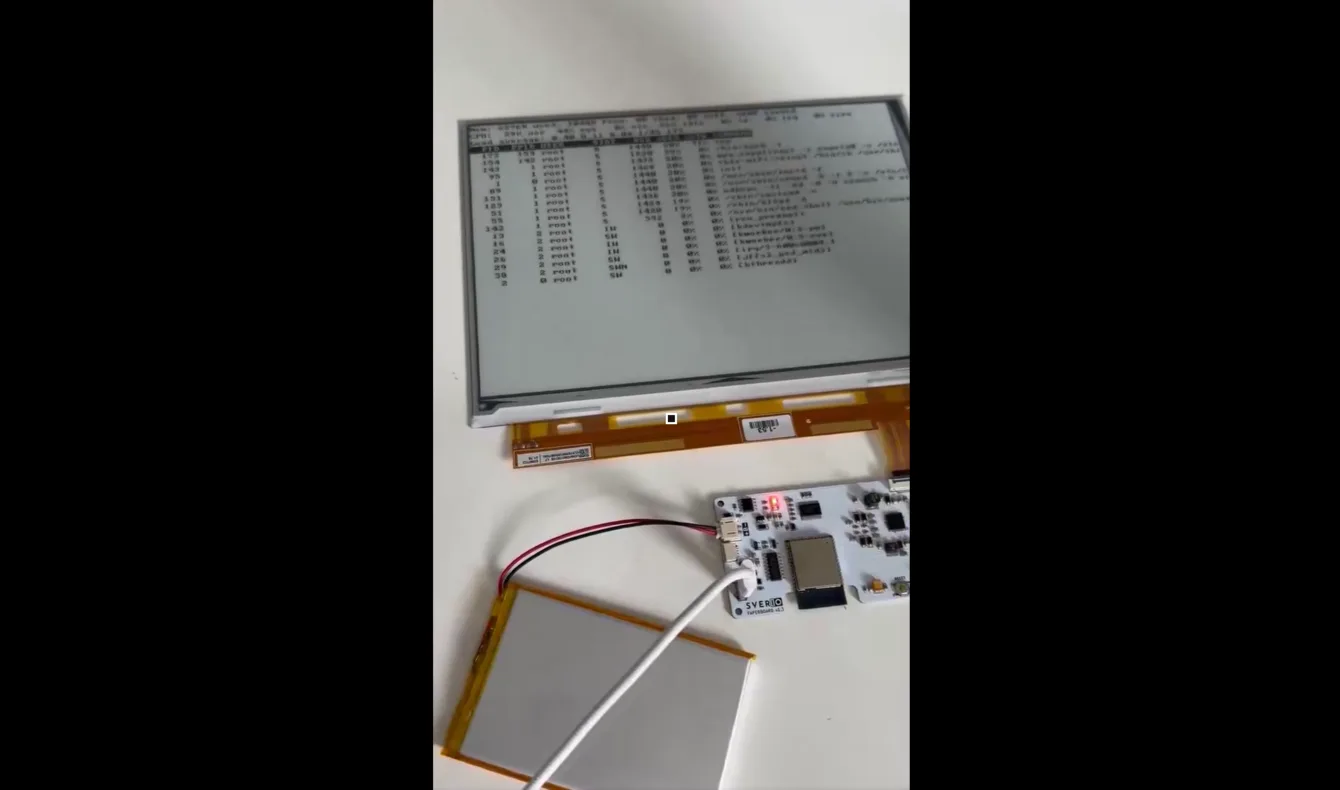
Linux 6.11 runs directly on the Xtensa core of the ESP32-S3—no emulation. And because a plain serial terminal would be too boring, the shell also mirrors to a 9.7″ ED097TC2 e-paper display (1200 × 825 px) after login.
The original demo was posted on X by user Svermigo:
What the videos show
The first clip shows the e-paper display with live shell output: uname -a reporting kernel 6.11.0-forkbank, a wifi scan, network association, and finally a successful
ping svermigo.czThe second video runs top and shows Linux processes, kworkers, shells and network traffic—all on a part with memory counted in megabytes.
From reset to login prompt the system takes roughly 14 seconds.
Real Linux on Xtensa
This is not a Linux API shim on top of FreeRTOS, nor an emulated RISC-V or ARM core. The project boots a Linux 6.11 kernel compiled straight for the Xtensa ESP32-S3.
The e-paper terminal + web-installer variant lives in the fork svermigo/Linux-on-esp32-S3, itself a fork of paulneja/Linux-on-esp32-S3.
It is more than a kernel plus BusyBox. You get Bash 5.2, Dash, Nano, GNU Make 4.4, MicroPython 1.26, Lua, cron, nc, socat, an HTTP server, Telnet and optional Dropbear SSH. Wi-Fi, DHCP, NTP and normal internet traffic all work.
Seeing
root@esp32:~#on an ESP32-S3 still feels slightly wrong.
Linux without MMU and experimental fork()
The ESP32-S3 has no traditional Memory Management Unit, so the kernel runs in NOMMU mode. NOMMU Linux itself is nothing new, but the usual Unix mechanisms—especially fork()—become painful.
The project therefore uses an experimental software memory banks approach. It is not a hardware MMU replacement (no memory isolation, no copy-on-write), but it is enough to let processes keep private data and run software that used to be problematic on simpler NOMMU systems.
Each fork() copies the private memory directly; the limit per fork is 512 KiB. The backend also forces single-core (UP) Linux and refuses forks from multithreaded processes.
Thanks to this, Bash with subshells and pipes, GNU Make, and multiple MicroPython processes all work.
On a part with 8 MB PSRAM this is one of the more interesting pieces of the whole effort.
Two cores, Linux and FreeRTOS side by side
The ESP32-S3 has two Xtensa cores and the project uses them in an unusual way:
- Core 1: Linux
- Core 0: ESP-IDF / FreeRTOS (also drives the e-paper on the display variant)
One reason is Wi-Fi. Parts of Espressif’s Wi-Fi stack are only available as binary blobs for ESP-IDF and are not easy to turn into a normal Linux driver.
FreeRTOS therefore handles the low-level Wi-Fi hardware while Linux talks to it over shared memory. From Linux’s point of view the network appears as interface espsta0. The board only acts as a station; SoftAP mode was removed.
So one ESP32-S3 is simultaneously running FreeRTOS and Linux.
16 MB Flash, 8 MB RAM
The reference config uses an ESP32-S3 N16R8:
- 16 MB Flash
- 8 MB Octal/OPI PSRAM
No SD card or extra RAM is required for Linux itself. That tiny amount of memory does force a few tricks, though.
The root filesystem is a read-only CramFS and most of the system uses XIP – Execute In Place, so binaries run straight from flash without being copied into RAM.
Writable data lives in separate /etc and /home partitions formatted with JFFS2 and mounted over the read-only root.
9.7″ e-paper instead of a monitor
The display version uses the SVERIO PaperBoard EPDiy controller board with ESP32-S3 and an ED097TC2 panel.
- 9.7″ diagonal
- 1200 × 825 px
- 16 grey levels (the terminal draws black-and-white with fast DU waveform)
- parallel interface, EPDiy support
Czech retailer Pajeníčko – SVERIO PaperBoard EPDiy controller
Czech retailer Pajeníčko – SVERIO PaperBoard 9.7″ ED097TC2 kit
Getting the shell onto the e-paper
Linux does not draw to the display via a framebuffer—that would eat far too much of the 8 MB PSRAM. Instead the kernel exposes /dev/epd, which ships terminal characters over shared memory to core 0. There an ESP-IDF firmware with a patched EPDiy library turns them into pixels.
After logging in as root on the serial console, epd-shell starts automatically and mirrors the shell to both the serial port and the display. Boot messages do not appear on the e-paper; mirroring begins only after login.
- text terminal 75 × 34 characters
- cursor movement, scrolling, inverse text and basic escape sequences (not full VT100)
- only changed lines are redrawn
- mirroring can be disabled by creating
/etc/paperboard-no-mirror
Someone in the replies asked whether the panel could act as a 60 Hz monitor. E-paper panels are scanned at roughly the same rate as LCDs (typically 50–120 Hz), but a single image update still takes several frames while the particles move. That fast e-paper is possible is shown by the Modos Paper Monitor running up to 75 Hz—thanks to a Xilinx Spartan-6 LX16 FPGA and its Caster controller that treats every pixel as an independent region and can even interrupt a refresh mid-frame.
On the ESP32-S3, EPDiy builds each line in software and feeds the LCD peripheral from a queue. A single update still requires multiple full-panel passes, and core 0 is also shared with Wi-Fi. That is why the display stays a terminal that only redraws changed lines rather than a monitor.
Flashing straight from the browser
You do not need a toolchain, kernel build or manual esptool work to try it. A web flasher using Web Serial is available—just Google Chrome on a desktop:
Two main images are offered:
- Paperboard V3 – for SVERIO PaperBoard v1 with ED097TC2, including terminal output on the e-paper.
- Headless V1 – no display, for any other ESP32-S3 N16R8 board.
The whole flash image is written, so any previous contents—including settings and user files—are overwritten.
After flashing, connect at 115200 baud (8N1, no flow control). Default login is root / changeme123. The password is public, so change it immediately with passwd—Telnet is enabled by default and sends credentials in the clear. Set Wi-Fi with the wifi command, which scans and prompts for the passphrase.
There is also a simulator
If you do not have suitable hardware you can still play with the Linux terminal in a browser-based ESP32 simulator:
ESP32 simulator – Linux terminal
A quick way to look around without flashing real silicon.
Native Linux vs. RISC-V emulation
Another route to Linux on ESP32 is to emulate a different CPU.
The project nodestark/esp32-running-linux emulates a RISC-V core and then runs Linux on top of it. A browser version also exists.
Technically neat, but fundamentally different from the approach described here. Emulation means the ESP32 must translate or interpret every instruction of the virtual CPU, which hurts performance.
Here Linux runs natively: the kernel is built for Xtensa and the ESP32-S3 executes those instructions directly.
Where did Linux for ESP32 come from?
The current project did not start from scratch. A large part of the Xtensa Linux support work was done by Max Filippov (jcmvbkbc).
His build infrastructure is worth a look:
It contains the build system for Linux on ESP32 and ESP32-S3. Max also maintains the kernel itself (branch xtensa-6.11-esp32 in jcmvbkbc/linux-xtensa), a modified Buildroot, and the esp-hosted firmware with the IPC mechanism that runs on the second core and gives Linux Wi-Fi via shared memory.
paulneja’s fork added the experimental fork(), a much larger userspace, hardware RSA acceleration and a complete build pipeline. Svermigo’s fork then layered on the e-paper terminal and web installer.
It is best seen as another step in several years of Linux-on-Xtensa development rather than a one-off hack.
What is Linux on ESP32 actually for?
An ESP32-S3 is never going to replace a Raspberry Pi or any other Linux SBC. If you genuinely need Linux, a normal single-board computer will give you more RAM, an MMU, faster storage and far higher performance.
What is interesting here is simply the technical boundary of what can be squeezed out of a microcontroller.
On a dual-Xtensa part with 8 MB RAM and 16 MB Flash you get Linux 6.11, Bash, multiple processes, MicroPython, GNU Make, Wi-Fi and ordinary network tools. It boots to a login prompt in about 14 seconds and can even paint its shell on a nearly ten-inch e-paper panel.
It is not a practical substitute for a Linux computer. It is, however, a very nice demonstration of how far an ESP32-S3 can be pushed today.
Article by Svermigo